Artificial intelligence can help a learner understand a difficult topic, practise examination questions, improve a piece of writing, organise a study plan or explore ideas for a school project. It can also help an educator prepare examples, design classroom activities, simplify explanations and create questions at different levels. However, an AI tool cannot automatically know exactly what a user wants. The quality of its response often depends on the quality of the instruction it receives. That instruction is called a prompt.

Writing an effective prompt is not about using complicated technical language. It is about communicating clearly. A good prompt explains the task, gives enough context, identifies the intended learner or audience, requests a useful format and sets sensible limits. It also reminds the user to review the response because AI can misunderstand a question, leave out important details or produce information that is incorrect.
This guide is written for beginners, especially secondary-school learners from S.1 to S.6 and the educators who support them. It uses simple school examples and encourages responsible use. The goal is not to make AI do all the thinking. The goal is to use AI as an assistant that helps people learn, create, question and solve problems while human judgment remains in control.
What Is an AI Prompt?
An AI prompt is the message you give to an AI tool. It may be a question, an instruction, a description or a combination of these. For example, “Explain photosynthesis” is a prompt. “Create five revision questions about photosynthesis for an S.2 learner and place the answers at the end” is also a prompt. The second prompt is likely to produce a more useful response because it tells the AI what to create, the class level and the desired format.
A prompt is similar to instructions given to another person. If a teacher says, “Write something,” learners may not know the topic, length or purpose. If the teacher says, “Write a 200-word composition describing your first day at a new school, using at least two examples of dialogue,” the task becomes clearer. AI also performs better when the instruction removes unnecessary guessing.
Check more about prompt engineering here:
Why Vague Prompts Produce Weak Answers
A vague prompt gives the AI too much freedom to guess. Consider the prompt, “Help me with mathematics.” Mathematics contains many topics, from fractions and algebra to geometry and probability. The AI does not know the learner’s class, the exact difficulty, whether the learner wants an explanation or questions, or whether answers should be shown. It may produce a response that is correct but not useful.
Prompt example
Poor prompt: Help me with mathematics.Better prompt: I am an S.2 learner who is struggling with solving simple linear equations. Explain the method step by step using simple English. Show one worked example, then give me four questions to attempt. Do not reveal the answers until I ask for them.
The improved prompt gives a clear topic, class level, learning need, language level, response structure and instruction about answers. It also protects learning because the learner must attempt the questions before seeing the solutions.
A Simple Formula for Better Prompts
A useful beginner formula is: Goal + Context + Audience + Format + Limits + Check. You do not have to write these labels every time, but you should think about them before sending a prompt.
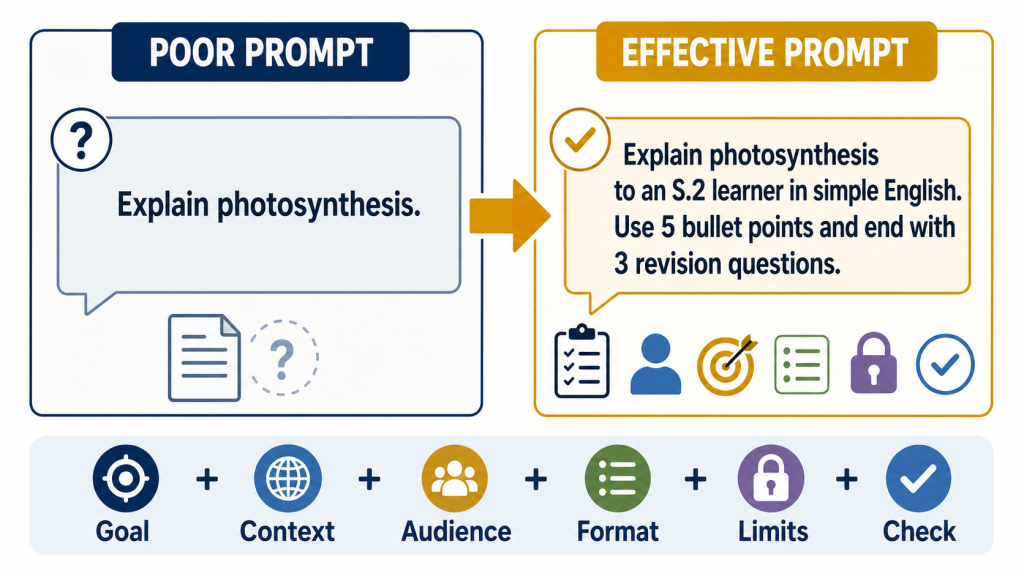
The goal states what you want the AI to do. Useful action words include explain, compare, summarise, create, question, review, organise and suggest. The context gives background such as the subject, topic, situation or place. The audience identifies who will use the answer, such as an S.1 beginner, an S.6 candidate, a parent or an educator. The format describes how the answer should be presented, for example paragraphs, numbered steps, a table, a quiz or flashcards. Limits may control length, difficulty, tone or information the AI must not invent. The check tells the AI to identify uncertainty or reminds the user what must be verified.
Prompt example
Example formula in action:Goal: Create revision questions.
Context: Biology topic on respiration.
Audience: S.4 learners preparing for an examination.
Format: Eight questions followed by a separate answer section.
Limits: Use simple English and include two application questions.
Check: Mark any question whose answer may depend on the syllabus wording.
Step One: State the Goal Clearly
Begin with a clear action. If you want an explanation, say “Explain.” If you want questions, say “Create practice questions.” If you want feedback, say “Review my work and give feedback.” Avoid prompts such as “Do this,” “Help me” or “Tell me everything.” These expressions do not define the actual task.
Prompt example
Poor prompt: Do my history.Better prompt: Explain three causes of the 1900 Buganda Agreement for an S.3 learner. Use three short paragraphs. After the explanation, ask me two questions that require me to explain cause and effect. Do not write an assignment for me.
The better version asks for learning support, not dishonest completion of schoolwork. It also requests questions that encourage thinking instead of simple copying.
Step Two: Provide Useful Context
Context helps the AI understand the situation. A prompt about farming may need the crop, location, season and available resources. A prompt about a school speech may need the event, audience and purpose. A prompt about science may need the class and topic. Without context, the AI may provide examples that are too general, too expensive or unsuitable for the learner.
Prompt example
Poor prompt: Tell me about farming.Better prompt: You are helping a secondary-school agriculture club. Explain three low-cost ways a small-scale maize farmer in eastern Uganda can reduce the loss of soil moisture during a dry period. Use simple English. Remind us to confirm practical advice with a local agricultural extension worker.
The improved prompt connects the response to a realistic user and setting. It also keeps a qualified person involved because an AI answer should not replace local inspection and professional agricultural guidance.
Step Three: Identify the Audience
The same topic should be explained differently to different people. An S.1 learner may need short sentences and familiar examples. An S.6 learner may need technical vocabulary, deeper analysis and examination-style practice. An educator may need learning objectives, common misconceptions and a classroom activity. Telling the AI who the response is for helps it choose a suitable level.
Prompt example
Poor prompt: Explain electricity.Better prompt for a learner: Explain electric current, voltage and resistance to an S.2 learner using a water-tank analogy. Use fewer than 200 words and explain where the analogy is imperfect.
Better prompt for an educator: Prepare a 20-minute introduction to current, voltage and resistance for S.2. Include one demonstration using safe classroom materials, three checking questions and two common misconceptions.
These prompts ask about the same subject but serve different users. Effective prompting is not only about the topic; it is also about the person who must understand or use the response.
Step Four: Request a Useful Format
The format determines how the answer is organised. A paragraph may be useful for an explanation, while a table can help compare two ideas. Numbered steps are helpful for a process. Flashcards support revision. Questions followed by a separate answer section protect independent practice. When the format is not stated, the AI chooses one, and that choice may not suit your purpose.
Prompt example
Poor prompt: Teach me acids and bases.Better prompt: Create a revision table for an S.3 chemistry learner comparing acids and bases. Use the headings meaning, common properties, two school-laboratory examples and safety precautions. After the table, give me five true-or-false questions. Put the answers below a clear divider.
Learners should still compare the response with their notes, textbook and teacher guidance. A neat table can contain errors just as easily as an untidy paragraph.
Step Five: Add Helpful Limits
Limits keep the response focused. You may ask for simple English, a maximum number of words, a positive tone, no invented statistics, no personal information or no answers until you have attempted the task. Limits should support the purpose without making the instruction overcrowded. If a prompt contains too many unrelated instructions, divide it into smaller prompts.
Prompt example
Poor prompt: Write a school announcement.Better prompt: Draft a friendly announcement inviting learners and parents to a school clean-up day. Keep it below 120 words. Leave blank spaces for the date, meeting point and contact number. Do not invent any details. Mention gloves and safe handling of rubbish, but ask the school to confirm the final safety instructions.
This prompt prevents the AI from making up dates or contacts. It also separates drafting from approval. The school remains responsible for checking the final message before it is shared.
Step Six: Ask for Explanations, Not Only Answers
A learner gains more when AI explains a method than when it provides a final answer. Instead of asking, “What is the answer?” ask for a hint, an explanation of the first step, or feedback on your attempt. This makes AI a tutor rather than a shortcut.
Prompt example
Poor prompt: Solve 3x + 5 = 20.Better prompt: I am learning linear equations. Do not solve 3x + 5 = 20 immediately. Ask me what operation I should perform first. If I make a mistake, give me a hint. Show the full solution only after I have attempted it.
This method supports active learning. Educators can also use similar prompts to create guided questions that lead learners towards an answer without removing the productive struggle involved in learning.
Step Seven: Improve the Prompt Through Iteration
The first response may not be perfect. Prompting is a conversation. Read the response, identify what is missing, and give the AI clear feedback. You can say, “Make the language simpler,” “Add a Ugandan school example,” “Remove repeated points,” “Give me a harder question,” or “Explain why the second answer is wrong.” This process is called iteration.
Good iteration is specific. Saying “That is bad” does not tell the AI what to change. Saying “The explanation is too advanced for S.1. Rewrite it using sentences of fewer than 15 words and use an example involving a school garden” gives useful direction. After every revision, check whether the response became more accurate and more suitable. A longer response is not always a better response.
School Examples Learners Can Use
Using AI for Revision
A learner can ask AI to create practice questions, flashcards, a revision timetable or a simple explanation. The prompt should name the class, subject, topic, available time and desired difficulty.
Prompt example
I am an S.4 learner revising photosynthesis for 25 minutes. Create a short revision plan with three stages: review, practice and self-check. Give me six questions from easy to challenging. Place the answers at the end and tell me which facts I should confirm in my biology textbook.
Using AI to Improve Writing
AI can provide feedback without replacing the learner’s voice. A good prompt should ask for comments on specific features and should tell the AI not to rewrite the entire composition.
Prompt example
Act as a supportive English teacher. Review my composition for clarity, paragraph organisation, grammar and use of examples. Do not rewrite it for me. Quote no more than three short parts that need improvement, explain the problem and ask me to revise one paragraph myself.
Using AI for Research
AI can help a learner generate research questions, organise notes or identify ideas that need checking. It should not be treated as the final source of truth. A learner should use textbooks, libraries, teachers, official websites and original sources to verify important claims.
Prompt example
Help me plan a school research project about plastic waste around our community. First ask me five questions about the location, people affected and information we can safely collect. Then suggest a simple research structure. Do not invent survey results or statistics.
Using AI for a Science Project
AI can support brainstorming, but practical experiments require safety rules and teacher supervision. Never ask learners to follow unverified instructions involving chemicals, electricity, medicine, fire or dangerous tools.
Prompt example
Suggest three low-cost ideas for demonstrating water filtration to S.2 learners. Use materials commonly found at school. Clearly separate filtration from making water safe to drink. Include safety warnings and state that the activity requires teacher approval.
Using AI for Career Exploration
A learner can use AI to explore careers, required skills and possible study paths. The response should be checked because course requirements and opportunities can change.
Prompt example
I am an S.5 learner interested in web development and educational technology. Explain the skills I can start building at school, suggest three beginner projects and give me questions to ask a working professional. Do not promise jobs or invent admission requirements.
Using AI for Educator Lesson Planning
Educators can use AI to brainstorm examples, differentiate activities and create checking questions. The educator must review the response against the curriculum, learner needs and school policies. AI does not know the class as well as the teacher does.
Prompt example
You are assisting an S.1 geography teacher in Uganda. Draft a 40-minute lesson outline introducing weather and climate. Include a simple local example, one pair activity, five checking questions and support for learners who need simpler language. Do not claim alignment with a curriculum document unless one is provided.
Common Prompting Mistakes
The first common mistake is being too vague. The solution is to add the exact task, topic and audience. The second mistake is asking for too much in one prompt. The solution is to divide the task into stages, such as planning, drafting, reviewing and improving. The third mistake is assuming the AI knows information that was never provided. The solution is to explain the situation and include the necessary material.
Another mistake is using AI’s first response without reviewing it. A polished tone does not prove accuracy. Learners and educators must check facts, examples, calculations and references. It is also a mistake to share personal or confidential information. Prompts should use fictional names or anonymous examples unless there is a safe and approved reason to use real data.
A final mistake is asking AI to replace human responsibility. An AI tool should not make final decisions about discipline, health, safety, marks or a learner’s future. It can help organise information or suggest questions, but accountable people must review evidence, listen to those affected and make fair decisions.
Responsible and Safe Prompting
Before sending a prompt, remove personal data that is not necessary. Do not enter passwords, PINs, one-time codes, Mobile Money details, home addresses, private photographs, medical information or confidential school records into an unknown AI service. Do not upload another learner’s work or image without permission. Educators should follow school policies and applicable privacy requirements when using learner information.
Prompts should not be used to create harmful, deceptive or humiliating content. Learners should not generate false images of classmates, impersonate teachers, spread rumours or create material that could damage a person’s dignity. If an AI-generated image, recording or video could be mistaken for a real event, it should be clearly labelled and checked before sharing.
Users must also consider bias. AI can reproduce unfair patterns from the information on which it was trained. Ask questions such as: Who might be missing? Does the answer use stereotypes? Would this advice work for learners without smartphones or internet access? Does it respect different languages, abilities and backgrounds? A responsible prompt may ask the AI to identify people who could be excluded and suggest ways to make an idea more inclusive.
Prompt example
Review this school technology idea for fairness. Identify learners who might be excluded because of disability, language, device access, internet cost or location. Suggest one practical adjustment for each group. Do not assume that every learner owns a smartphone.
How to Check an AI Response
After receiving an answer, stop before copying or sharing it. Read the complete response. Mark names, dates, numbers, quotations, laws, scientific statements and strong claims. Compare them with reliable sources. For schoolwork, useful checks include textbooks, teachers, library materials, examination guidance and official websites. For health, legal or safety matters, consult a qualified professional.
Also check whether the response answered the actual question, used the requested level and format, and respected the limits. Look for contradictions, missing steps and examples that do not fit the local context. If something is uncertain, ask the AI to show which claims require verification, but do not rely on the AI alone to verify itself.
Prompt example
Review your previous response. List every claim involving a date, number, named organisation or scientific fact. For each claim, explain what type of reliable source I should use to verify it. Do not say a claim has been verified unless a source was actually checked.
A Quick Prompt Checklist
Before pressing send, ask yourself six questions. Have I stated the goal? Have I given the necessary context? Have I identified the audience or class level? Have I requested a useful format? Have I added sensible limits? Do I know how I will check the response? If the answer to these questions is yes, the prompt is likely to be clear enough for a useful first response.
After the response arrives, ask a second set of questions. Did the AI answer my task? Is the language suitable? Which facts need checking? Is anything unsafe, unfair or private? What should I change in the next prompt? This habit turns prompting from a one-time command into a thoughtful learning process.
Final Message to Learners and Educators
Effective prompting is a communication skill. It requires a person to understand the task, organise ideas and explain what a useful result should look like. These are valuable skills even when no AI tool is available. The person who asks a clearer question is often better prepared to evaluate the answer.
For learners, the best use of AI is not to avoid effort. It is to receive explanations, practise skills, test understanding, explore ideas and improve work. For educators, AI can reduce time spent on early drafts and create more options, but professional knowledge, care and classroom judgment remain essential.
Use AI with curiosity, but do not switch off your judgment. Give clear instructions, protect personal information, check important facts and remain responsible for what you submit or share. AI can produce words quickly. Meaningful learning still depends on the human being who asks, thinks, verifies and acts.